Hi Maria, no worries, glad to hear that is working!
Best wishes, Thomas
Hi Maria, no worries, glad to hear that is working!
Best wishes, Thomas
We delivered several new features and improvements in the months of October and November. Here’s a run down of what’s new and improved in Pressbooks:
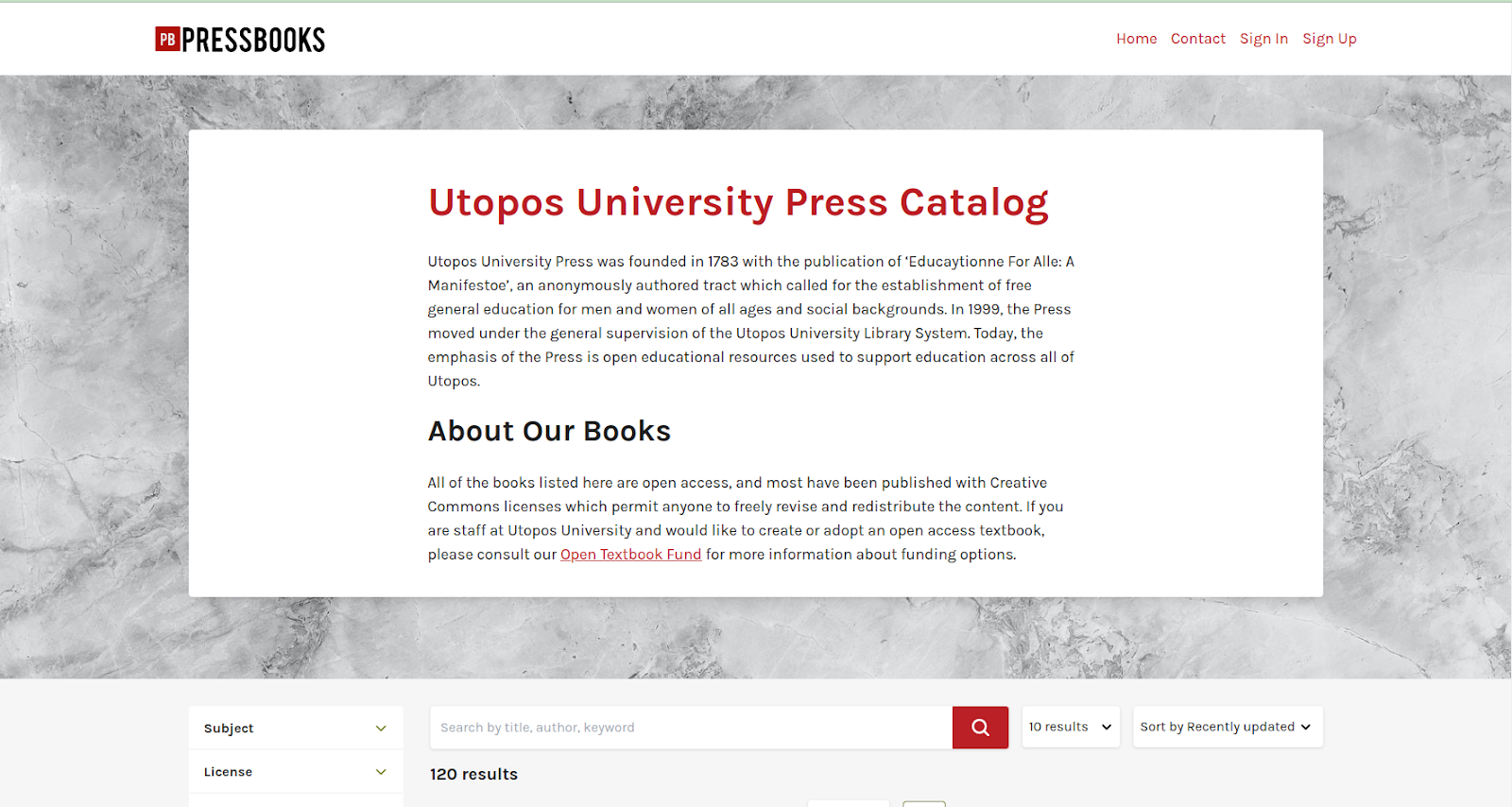
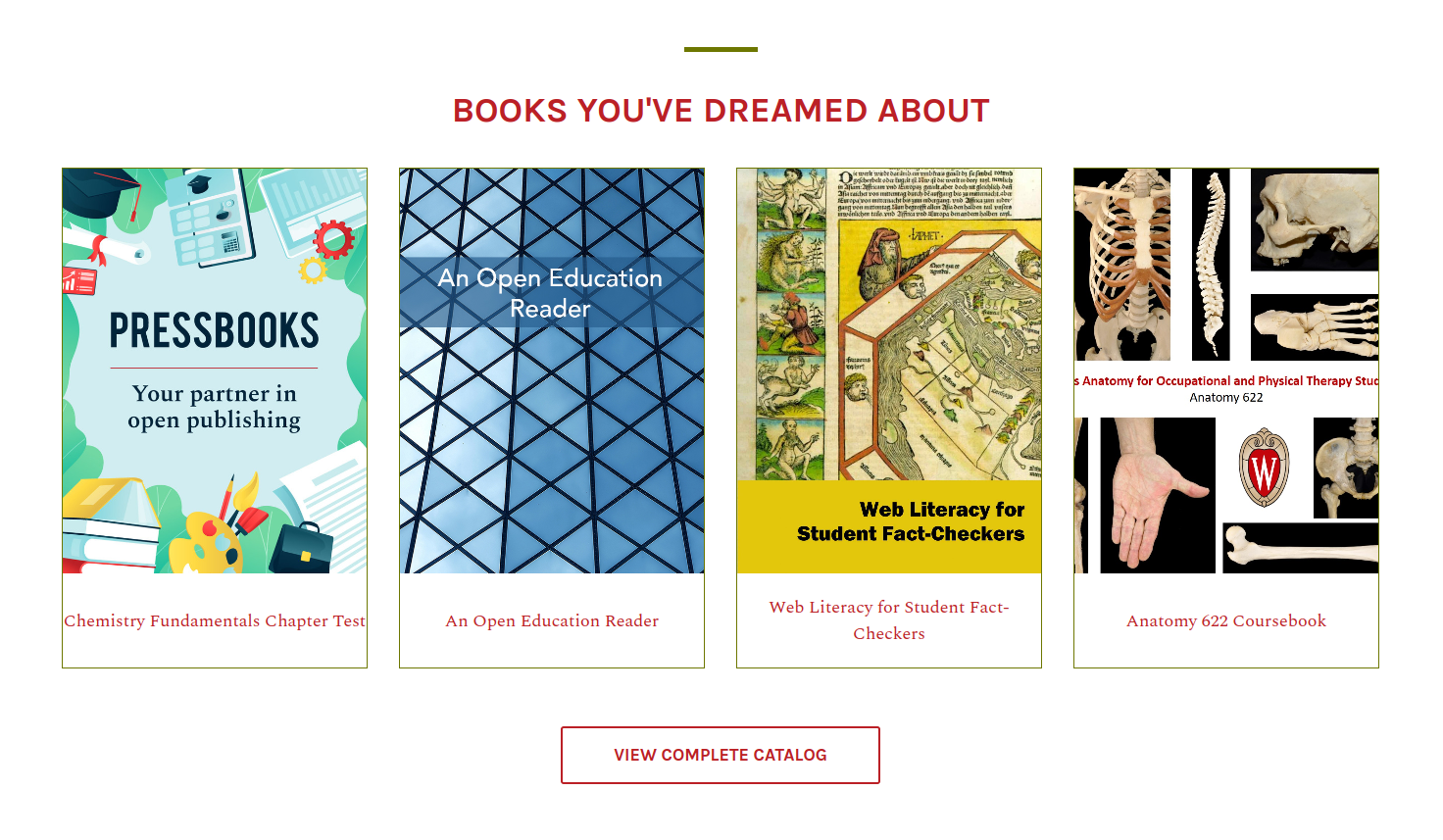
One of our biggest goals this past quarter has been to provide authors and network managers with more tools for showcasing the books they’ve worked so hard to publish. To that end, we completely overhauled the existing network catalog with a focus on presenting books in a more attractive fashion, and giving visitors more tools for searching and filtering cataloged books so that they can more easily find and share what they’re looking for.
For open source/self-hosted users, this new network catalog is available via a free and open source plugin: GitHub - pressbooks/pressbooks-network-catalog: A Pressbooks plugin which provides an improved catalog for the Pressbooks Aldine theme. Once you’ve installed and network activated the plugin, any page on your root site you’ve chosen to use the ‘catalog’ template for will display the new catalog. You can change the title and URL of catalog pages, add new preferatory/banner text, and set a custom hero image by changing the page’s featured image.
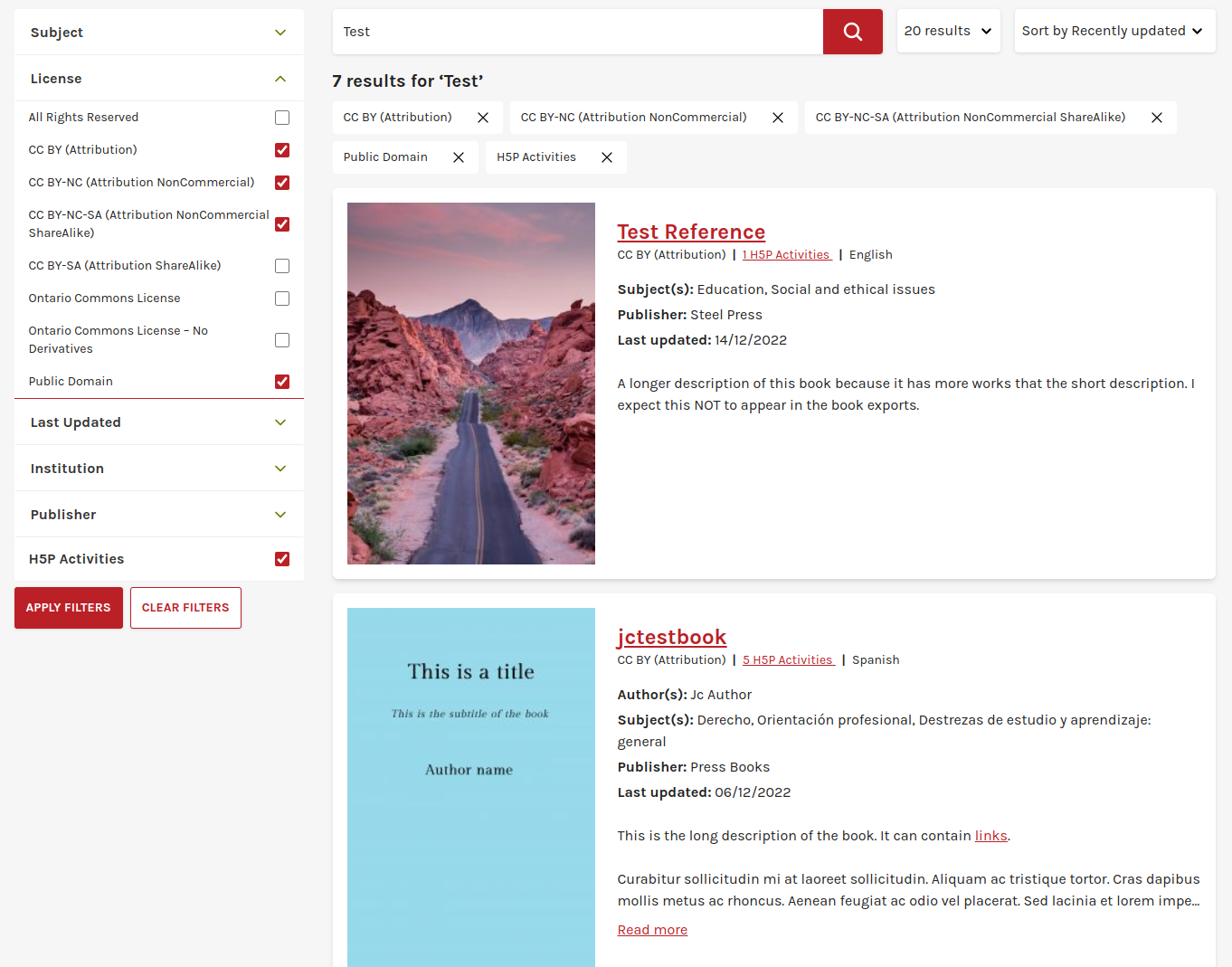
The new catalog will display all of the books listed in your network catalog. Users can use several search, filter, sorting, and pagination tools to refine and share results from your catalog:
To see a demonstration of this catalog and its several features, please see the video recording of our recent Pressbooks Spotlight session on ‘How to Publish & Showcase Your Books’: https://www.youtube.com/watch?v=iUyXAEfr2Po&t=1773s
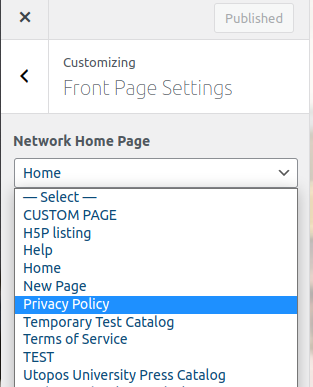
We’ve also made a few other complementary changes to the Aldine theme itself. First, you can now set any page on your root site as your network front page, including the new network catalog. To change your ‘front page’, visit your network root site, click ‘Appearance’ → ‘Customize’ and choose your desired page from the dropdown menu in the new ‘Front Page Settings’ menu
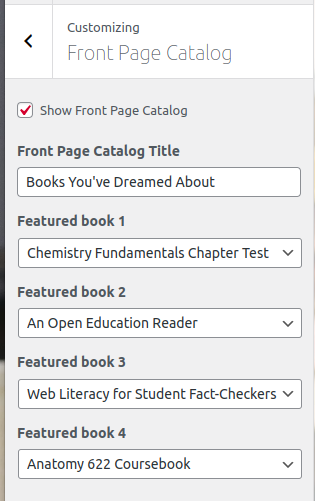
We’ve also given all network managers the ability to define ‘featured books’ which appear on the standard front page. Any book that you’ve listed in your network catalog can be set as a featured book. To use the ‘featured books’ setting, click the ‘Front Page Catalog’ option. You can set a block title and select up to four featured books.
Instead of displaying a banner with single-color book chips, the section will now display up to four book covers along with links to the book’s home pages and a call to action link to your network catalog.
We also released a number of smaller features, bug fixes, and other enhancements in the past few months. These include:
Adding support for the Khmer alphabet. To add script support for Khmer to your book and all export routines, simply click ‘Appearance’ → ‘Theme Options’ and select Khmer in the Language & Script support input field
improving the accessibility of input fields, editor toolbar buttons, and search field labels
improving export routines (fixed a few bugs affecting special characters in titles & subtitles and chapter numbering in the PDF table of contents)
improving how H5P results are synced and sent to the LMS
Recent releases of Pressbooks and all related plugins and themes now require PHP 8, as PHP 7.4 is no longer in security support. We will be working to ensure full compatibility with PHP 8.1 and 8.2 in the new year.
We also added a few new ‘health check’ API endpoints, which can be used to check your network’s database connection, Redis/cache connection, the remaining family system space, and availability of the main site, if desired. See feat: Health check endpoint by fdalcin · Pull Request #3020 · pressbooks/pressbooks · GitHub for details.
Our October 2022 Pressbooks Product update can be seen here: https://www.youtube.com/watch?v=Bd8paKkGnSo. Our recent Pressbooks Spotlight session on publishing and showcasing your books can be viewed at https://www.youtube.com/watch?v=iUyXAEfr2Po
Since hiring Michelle Weremczuk last year as our first dedicated UX/UI designer, we’ve been working hard to make the overall Pressbooks experience more user-friendly. You’ve likely already seen the new network catalogs, new user dashboard, improved clone a book page, and new book dashboards we’ve shipped in recent months as part of this ongoing effort.
In case you missed last month’s product update webinar, this post will give you a preview some additional changes to the Pressbooks admin interface that are coming soon. Each of these changes are designed to simplify the sometimes overwhelming experience of administering a Pressbooks network and make it easier for network managers to perform common tasks. Most of the changes described below will only be visible to network managers, though end users will also be affected by the changes we’re making to the top nav bar.
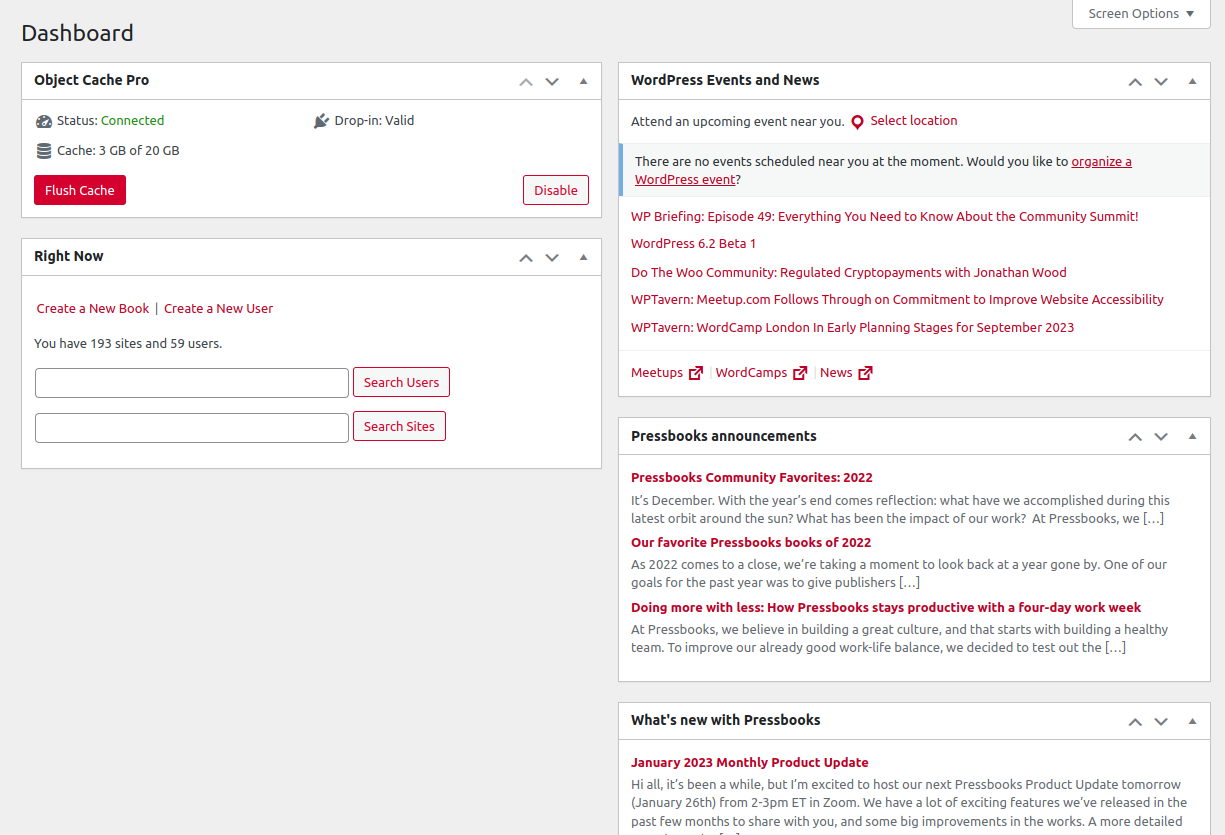
First, when network managers log into Pressbooks, they will see a totally redesigned network administrator dashboard. This redesign was based on interviews and conversations with several network administrators and is designed to help users with this role to more quickly and efficiently perform their most important duties and responsibilities.
Before:
After:
As the screenshots above show, the new dashboard presents:
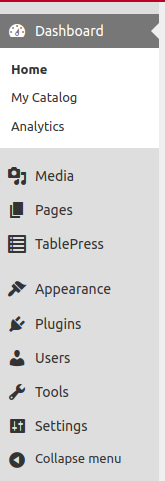
Over the course of our interviews with network managers, we heard over and over that having multiple dashboards which controlled different parts of the network was confusing and sometimes frustrating, especially when the network root site’s navigation menu so closely resembled the nav menu for individual books on the site. To reduce this confusion, we are combining all of the important links used by network managers into a single ‘Administer Network’ menu.
Before (two separate admin menus):
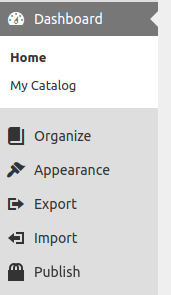
After:
Rather than presenting two separate nav menus for the network and the root site, network managers will see a single consolidated menu which includes links for everything they need to configure and administer their network. This nav menu will include seven clear headings:
Finally, we wanted to reduce confusion as users navigated the various top nav-bar options and make creating books and adding users easier to perform no matter where a user was in the admin interface.
Top-level nav bar for Network Admins Before:
Top-level nav bar for Network Admins After:
Top-level nav bar for regular end users Before:
Top-level nav bar for regular end users After:
We are currently putting the finishing touches on these changes and expect to have them fully tested and ready for release near the beginning of March, along with updates to our official guides & documentation.
If you’d like to see and discuss these and other updates to Pressbooks on a regular basis, please consider attending our monthly product update webinar series. These webinars are held in Zoom from 2-3pm ET on the last Thursday of every month, unless otherwise noted. The agenda and Zoom link can be found at Pressbooks Product Update Agendas and recordings from past webinars can be found at Pressbooks Product Update Webinars - YouTube.
The changes described here were included in our latest version of Pressbooks (6.9.0) and have been deployed to all the enterprise networks we host.
Hi! We are at the early stages of building our members’ institution pages using the Aldine theme. Is there a way to remove the hero image (header image)? It’s not a good look for the pages, lots of empty space. Thanks so much. Elisabeth, FLVC
hi @eball probably – can you share a link to one of the pages in question and a brief description of what you’re trying to accomplish? If you don’t want to post publicly, you can send me a DM or write to our premium support address.
I emailed you, Steel. Thanks!
No problem. I sent a reply, but in case others have similar issues, the solution here was to remove the aldine page section shortcode. Those are intended for use only on the ‘home’ page template. If used in other ‘child’ pages, they’ll wind up breaking the display or at least making it look pretty odd. I’ve left a note with our support team to update our network manager guide docs to help others with this in the future as well.
@EDU_Managers & Pressbooks Community Members! We’re thrilled to announce that we’ve made it easier than ever before for authors to write and display mathematical and scientific notation in Pressbooks using our built-in LaTeX/MathJax solution. This update applies to both SaaS and open source versions of Pressbooks.
If you’ve been writing math or scientific notation in Pressbooks, you’ll find it easier to use familiar LaTeX syntax. Supported expressions will render properly everywhere with no extra work or configuration required.
If you or your authors activated the WP Quick LaTeX plugin in order to use additional features that were not previously available in the native Pressbooks solution, you should consider deactivating that plugin to see whether the native solution now meets your needs.
To learn more about the different methods for rending math in your book, see our updated guide chapter. If you have previously published guides for your local users, consider updating them with this new information.
Our team is currently conducting user research with power users in STEM disciplines in order to prioritize future improvements. If you or any of your Pressbooks-using creators would like to participate in a research interview on this topic, please book a 30-minute session with our team.
Self hosted network managers and open source users – you can find the updates in our pb-mathjax repo. Instructions for installing and deploying have been updated in the repo readme: GitHub - pressbooks/pb-mathjax: A replacement for wp.com/latex.php but instead of LaTeX, it uses MathJax.
Such an exciting announcement. I think the most exciting thing about the shift from MathJax 2.7 → 3.2 is the potential for innovation this creates.
One of the problems with MathJax 2.7 was how complex it still was for end users of assistive technology. While MathJax 2.7 technically made math accessible because it embedded the Assistive MathML behind the scenes, it really only worked with exactly the right screenreader using exactly the right settings. Even professional screenreaders like JAWS or NVDA used to require additional plugins like MathPlayer or additional help to read the math.
MathJax 3.2, the math to text engines have been integrated directly into MathJax itself. This is important, because MathJax itself can help generate the Alt Text for a screenreader. Previously, MathJax just embedded Assistive MathML and relied on the end user to have the technology to convert that Assistive MathML to alt text. The simplification of embedding the accessibility libraries directly into MathJax should allow some of the more lightweight screenreaders purchased by institutions to work.
It might also be important to Pressbooks. Wouldn’t it be nice if our PDF exports with math could be made accessible on export? Previously that wasn’t possible, so we would have to direct users of assistive technology to the online version because it would be the most accessible for them, but the migration to a modern version of MathJax might make further innovation possible.
Another development I’ve been following closely is the release of the PDF UA-2 standard. Currently, we use the PDF UA-1 standard for Digital PDF exports. PDF UA-2 includes support for MathML in a PDF. So now I’m watching release notes for PrinceXML to see when they will support the PDF UA-2 standard (not yet).
So I’m excited for what comes next from Pressbooks and Math Accessibility! Thank you Pressbooks team.
I wanted to share how SUNY’s self hosted network was using pb-mathjax.
We use a very simple wrapper around Pressbooks open source code so that we can run pb-mathjax in a docker container.
In the pb-mathjax readme, there are two official approaches to running pb-mathjax.
We chose option 3. Run a separate server, which has the benefit of not needing to complicate the Pressbooks server or install additional dependencies on the Pressbooks server. Running a dockerized version gives us more flexibility than being required to run it on Amazon.
If you share this github repo with your system administrator, its a very simple docker compose file that will set up a NodeJS server with nginx. The dockerfile just syncs to the most recent version of pb-mathjax each time it restarts. The maintainer of this simple wrapper around pb-mathjax is Taylor Jadin from Reclaim hosting. I hope it helps another open source user!
Ed
@beckej Thanks so much for the information you’ve shared here. We are excited to finally be making these improvements to how we support mathematical & scientific notation and we appreciate your enthusiasm for this work.
We’ve got some exciting news to share: the Pressbooks Community Forum is getting a refresh! 
Over the years, our forum has become a great place to ask questions, share ideas, and connect with other Pressbooks users. As it’s grown, we know it hasn’t always been easy to find the right place to post—or to track down helpful answers.
So, we’re streamlining things. To make the forum easier to navigate, we will retire the private group for enterprise network managers and simplify forum categories to match the main types of Pressbooks users. Here’s the new structure:
Pressbooks Product Updates – official updates from the Pressbooks team (no change here)
Using Pressbooks – for authors, editors, and other Pressbooks end users
Administering Pressbooks Networks – for network and institutional managers who administer Pressbooks networks
Installing/Hosting Pressbooks – for people handling DevOps and server management
Contributing to Pressbooks – for developers, translators, and others contributing to Pressbooks software
As part of this change, we’ll also:
Pin helpful resources in each category to make it easier to get started
Move older topics into the most relevant new category
Retire or archive outdated categories and threads, including the private group for network managers.
Forum updates will begin this week and should be completed by mid-October. We believe this redesign will make the forum easier to navigate and use for everyone. Thank you for being part of the Pressbooks community—we’re excited to share the updated forum with you soon!
The forum restructure has been completed. We’ve created the new categories, made relevant subcategories, categorized/moved existing topics, and updated documentation and instructions for using the forum. We hope that all of you find the forum easier to use and navigate. We’re grateful to have you in our user community and appreciate all of you who respond to questions from your peers!
We released a few updates and product features in February, including changing the placement of the ‘Import’ tool in the user admin interface and the addition of a new ‘institutions’ field in book info.
Previously, if you wanted to import content, you had to go into Tools and find the Import option. ‘Import’ is now a top level menu option, meaning that it’s much easier to find and use from the book admin dashboard.
The ‘Import’ tool allows authors to get content quickly into Pressbooks from a variety of different sources: EPUB files, Word documents, XML from WordPress or Pressbooks, and API-based cloning of parts of other openly licensed books published with Pressbooks. See our guide for more information or watch the relevant clip from our latest product update below:
We host and support an increasing number of consortial Pressbooks networks, which publish books produced by authors from multiple colleges or universities. Many of you have requested the ability to indicate more clearly which institutions collaborated to produce a particular text or which colleges/universities are using a particular adaptation of an open text.
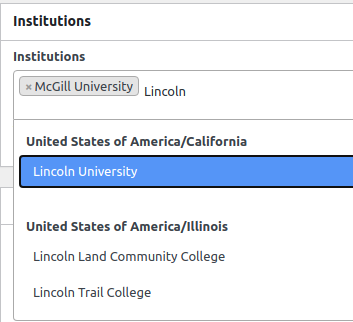
We’ve built a new feature to allow you to select multiple institutions for each book via the book info interface. You can find and select institutions by typing the first few characters of the institution’s name. The institution’s country/state/province will be displayed above the school in the selector, to help you disambiguate colleges or universities in different regions that share the same name.
In our initial release for this feature, our institution list includes all of the colleges and universities we are aware of in Canada, the United States and Australia. We plan to update the institutions list with colleges and universities from other countries in future releases. If your college or university is missing from our institution list, please let us know!
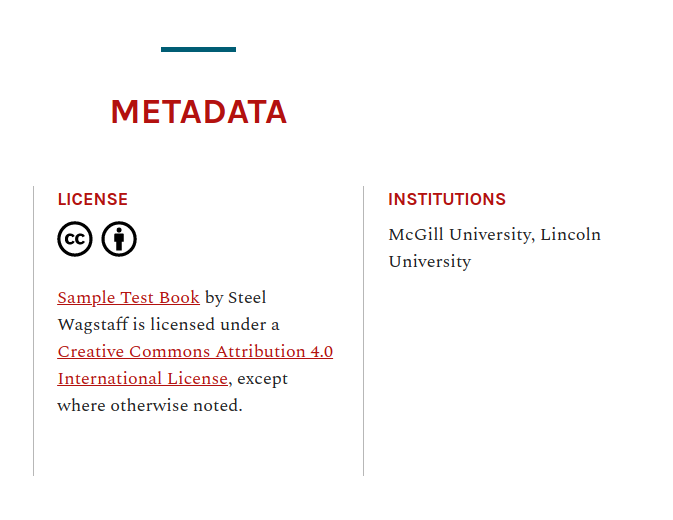
All institutions selected will display in the ‘Metadata’ section of your webbook’s home page.
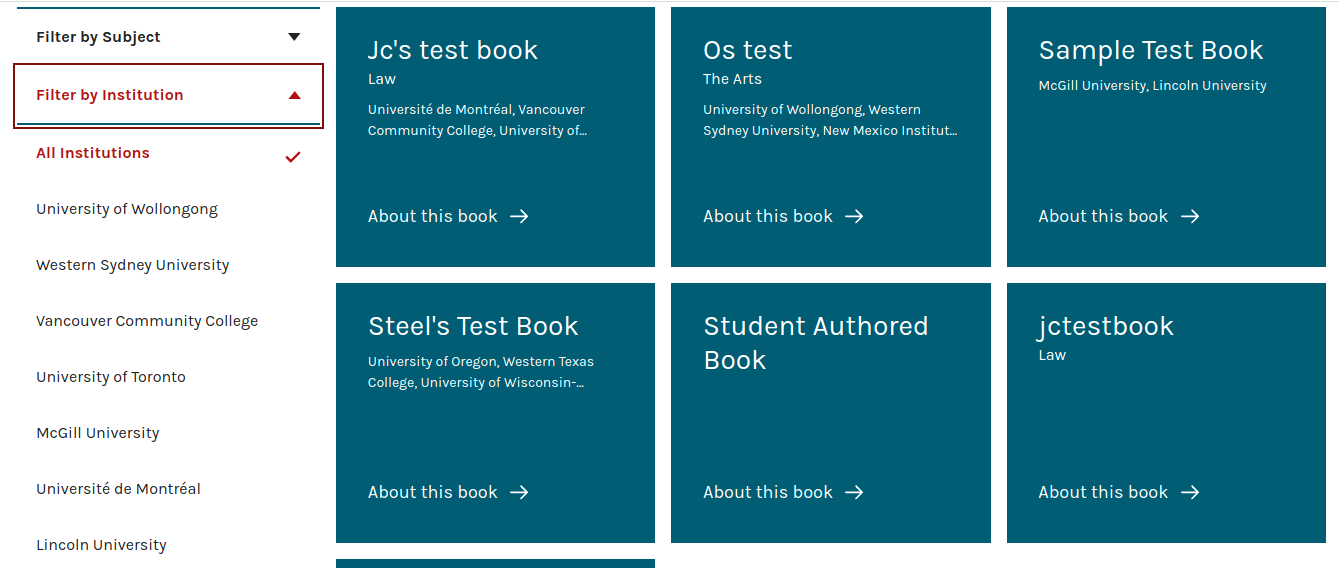
Institutions will also be displayed on the Aldine catalog’s book card and the network catalog now includes a filter to allow you to select books by institution.
You can see this feature demonstrated in our latest product update:
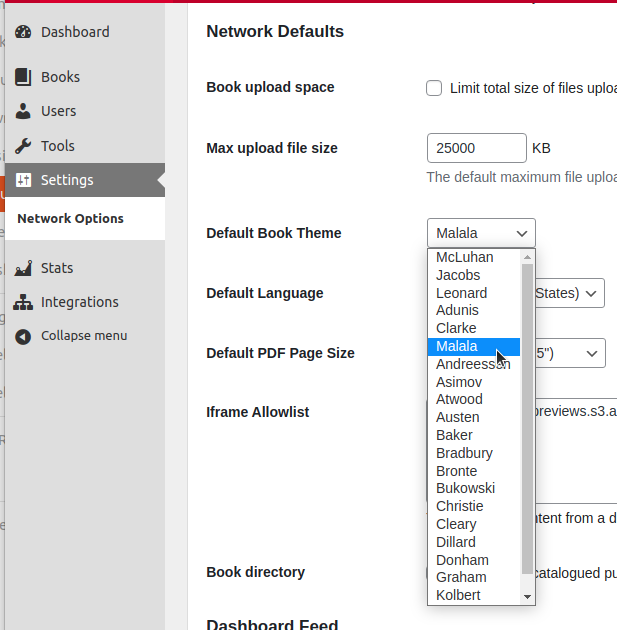
We’ve set the beautiful Malala theme (designed with textbook production in mind) as the default new book theme for most of the EDU networks we host. Network managers have the ability to change the default theme to any of the supported themes installed on their network. On PressbooksEDU networks, you can do this by clicking Network Admin->Settings and finding the relevant ‘Default Book Theme’ setting in the Network Defaults section.
This feature has been added to core Pressbooks. Super admins on self-hosted networks should be able to find this option under Network Admin → Network Settings → Theme Settings → Default theme
We released a handful of minor bug fixes in February as well, including improvements to our EPUB exports, support for including SVG files in our cloning routine, and making sure that users with the subscriber role were given the expected ability to clone new books.
To learn more about what we’ve built and released in March, please join us at 2pm ET on March 31 for our next monthly product update webinar!
Sorry it’s not as timely as this update could have been, but here’s a rundown of work that we finished & delivered in December 2022/January 2023. Better late than never is my motto for these written recaps!
First, we made some major changes to the user and book dashboards that people see when they first log into Pressbooks or visit their book’s administration panel. In place of the old designs which featured a wall of text and links, we’ve provided a more visually engaging that highlights the most common actions users want to take at these stages.
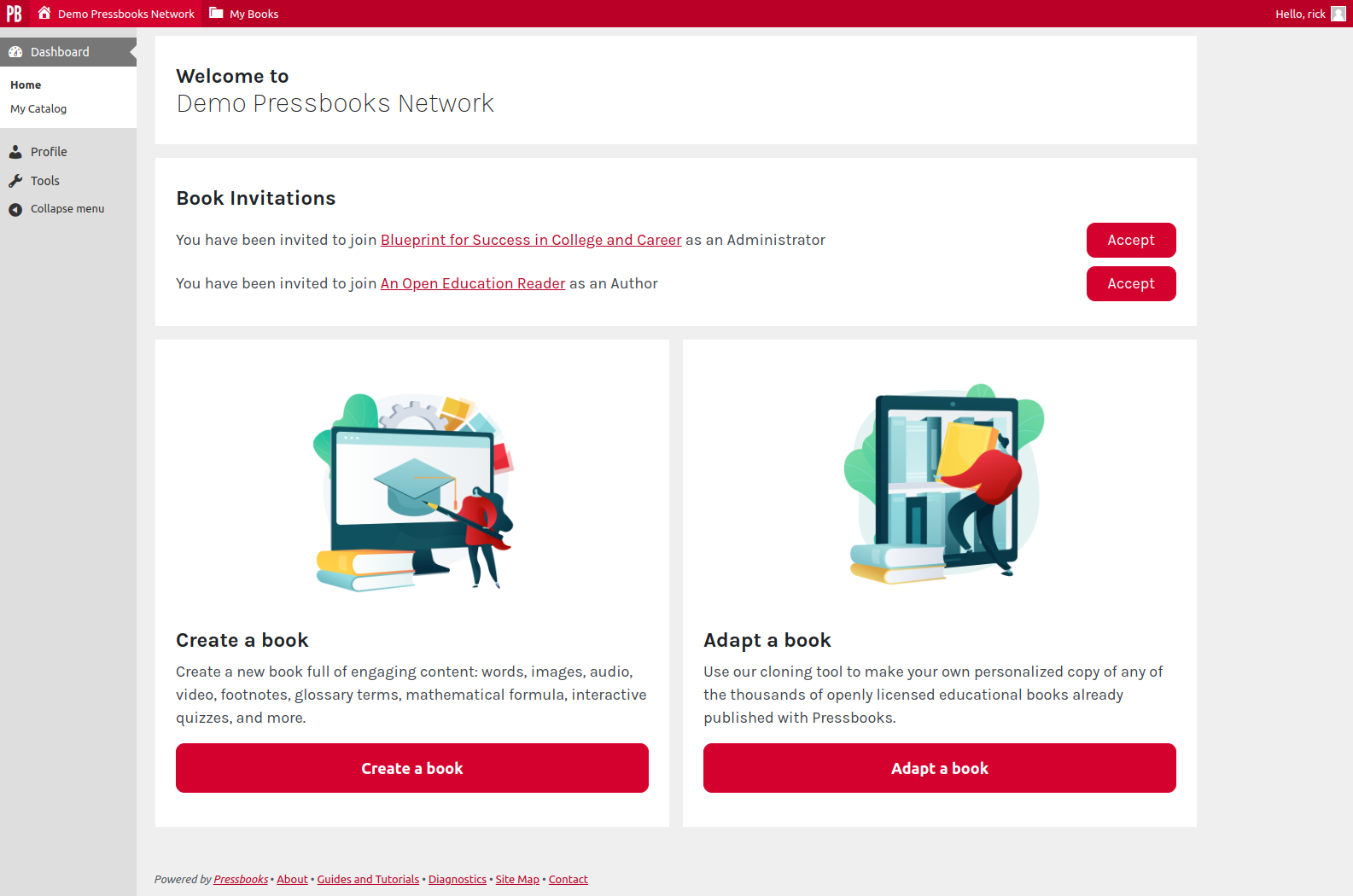
The new user dashboard now includes a clear welcome message, displays any pending book invitations, and clear prompts to get started by creating or adapting a book (the most common actions taken by new users):
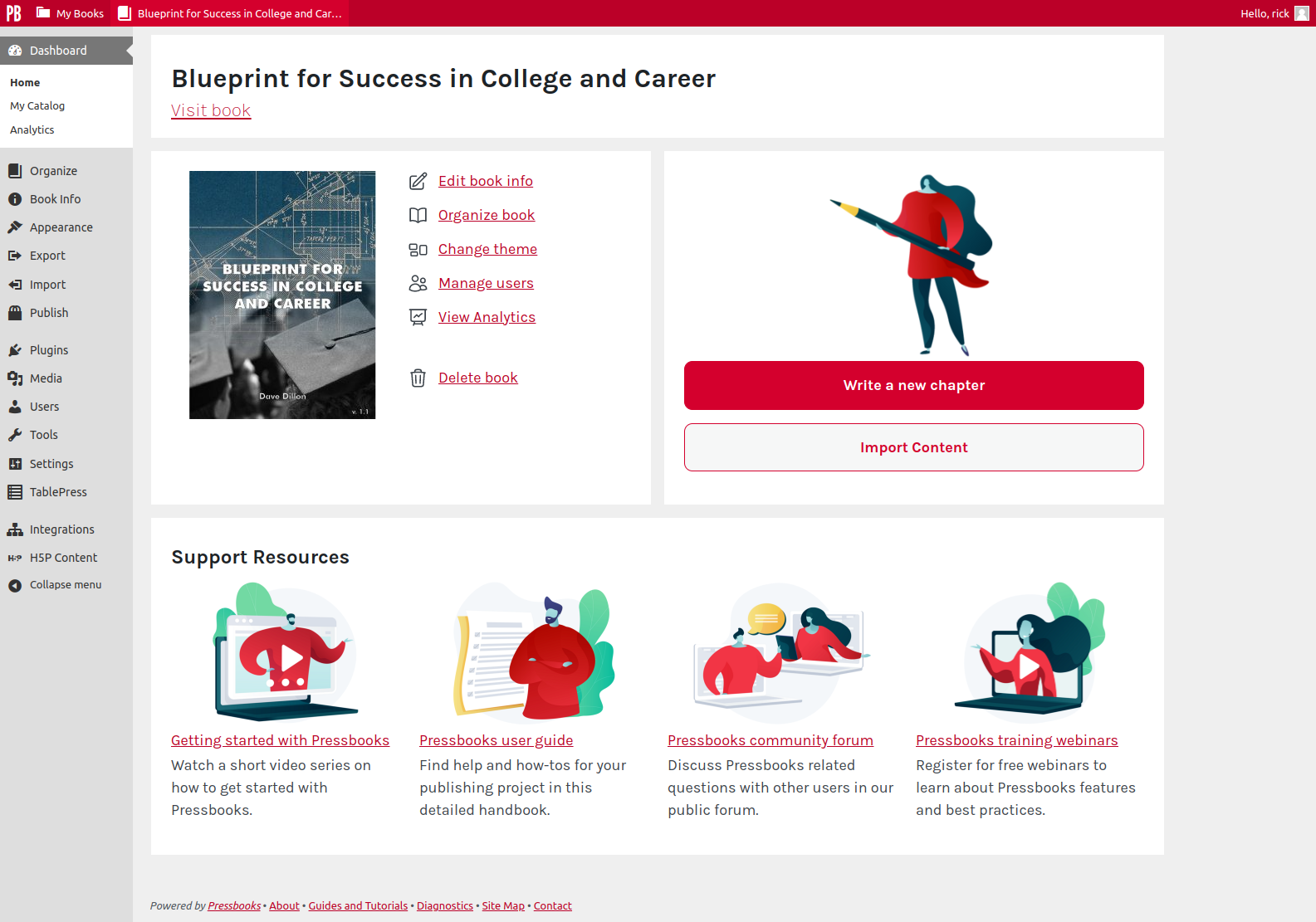
The book dashboard has also received a major facelift, with an introduction section that includes a link to allow the user to quickly view the book home page, an ‘admin’ panel which includes links to the most common administrative actions, a ‘creation’ panel which includes buttons which allow them to quickly create a new chapter or access the import page, and a support block with links to recommended resources that can help them accomplish their publishing goals for their project:
In both of these dashboards, the links displayed to a user will be connected to their permissions in the network or book, respectively, so that users with the role of ‘administrator’ will see more options than those with ‘collaborator’ or ‘subscriber’ roles, for example.
Second, we improve our Clone a Book page by giving it a visual refresh and adding a new feature that allows users to search the Pressbooks Directory from this page directly. In our interviews with users, many of them mentioned how powerful the Directory was, but that it was sometimes difficult to know how they could adopt or adapt a book when browsing the Directory, or to figure out how to find the right book for cloning from within the Pressbooks admin interface. We’ve attempted to make that easier by building a quick and lightweight search utility directly into the Clone a Book page (screenshot below)
You can now enter any search term you like directly into the Clone a Book page and will be presented with up to 20 openly-licensed results from the Directory, along with basic metadata for the book. Clicking the book title will open the book itself in its original context for further exploration. Clicking ‘Select this book’ will populate the relevant information into the cloning tool so that you can proceed with making your own personalizable copy of the text in question. Users who want to see more results can either modify their queries or visit the Directory directly, where more powerful search and filtering tools are available.
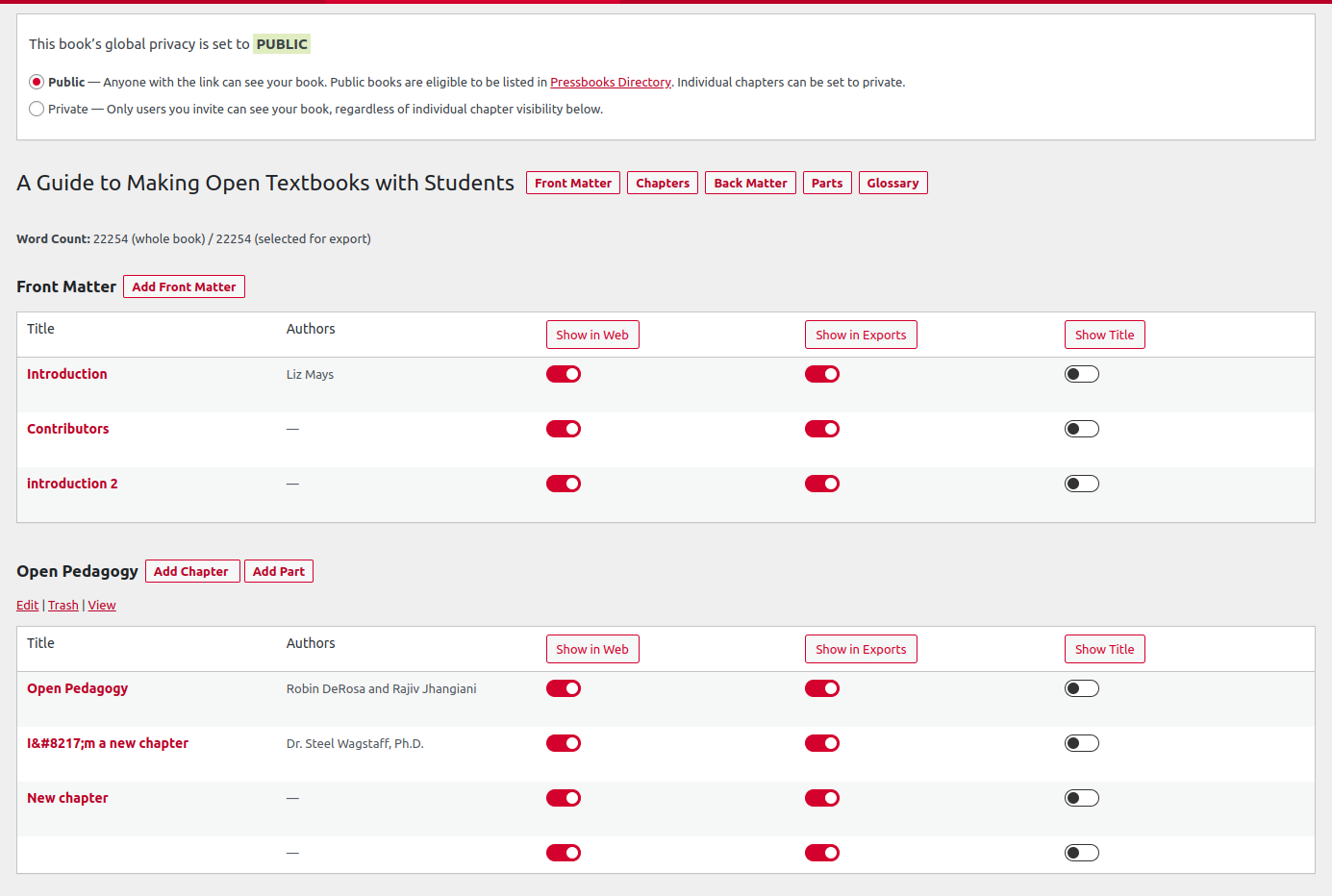
Third, we made significant improvements to the layout and functionality of the ‘Organize’ page within each book’s administrative menu. The new organize page is fully accessible by keyboard and has received other structural and labelling improvements for users of assistive technology. We also made it more clear visually the show in web, show in exports, and show title options are on/off toggle options, and that the table headers are themselves ‘buttons’ which allow users to globally toggle the values on and off for all items within a given part. Screenshot of redesigned ‘organize’ page below:
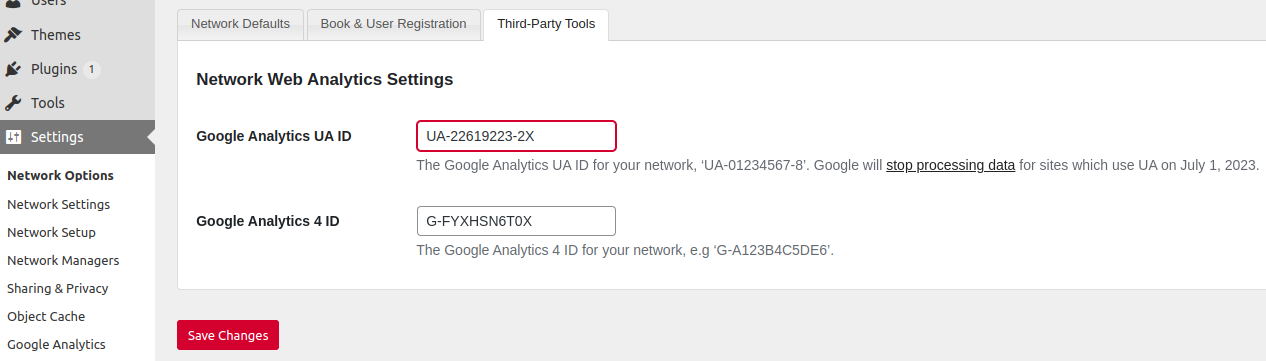
Google Analytics 4 has replaced Universal Analytics as the default Google Analytics version used for new properties. Universal Analytics will be retired on July 1, 2023. We’ve added support for GA4 alongside of UA in Pressbooks and will support networks who wish to use either or both through July 1, when we will remove support for UA.
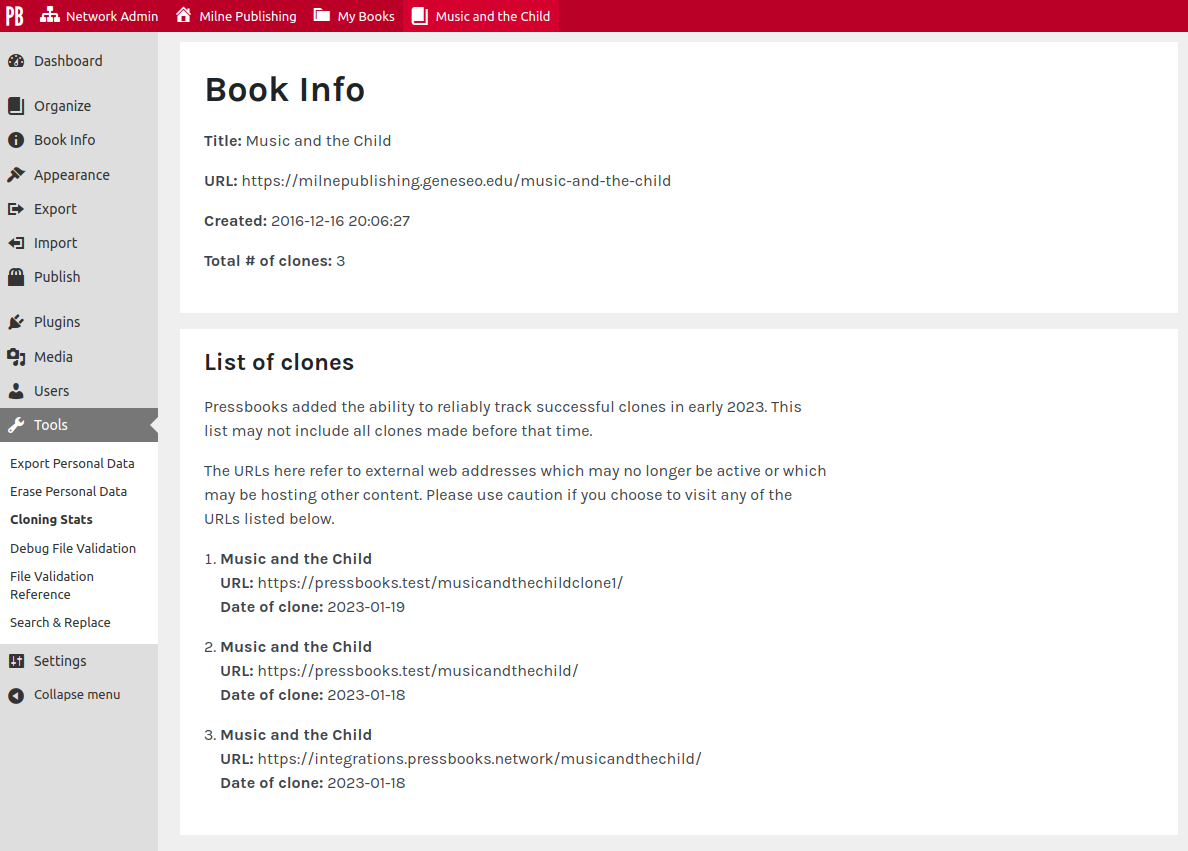
Finally, many authors have expressed a desire to know more about how their book is being adapted and used by others. To that end, in our latest release of Pressbooks we adjusted the cloning routine so that a successful completion of the cloning routine will notify the source book that the book has been cloned and the URL where the clone was created. The network hosting the source book will now be able to track and display information about known clones made since this feature was added. Each book now has a new ‘Book Info’ page which displays information about all known clones made since this feature was added. For now, this information can be found in the book dashboard under Tools → Cloning Stats (though this is subject to change in a future release). See screenshot below:
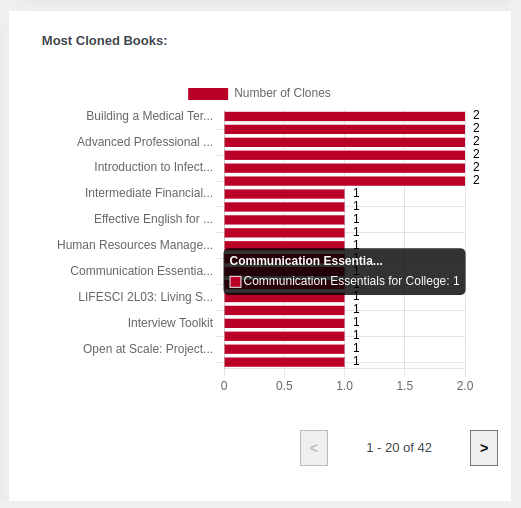
We’ve also added a new bar chart for network managers on enterprise networks showing the most cloned books on your network since the feature was added. This can be viewed on your network stats page:
We no longer provide these regular updates in the Community Forum like we once did. If you’re looking to see the latest information about Pressbooks releases, see our release notes posts in our blog, or view the actual releases in our various GitHub repositories (like Releases · pressbooks/pressbooks · GitHub)