An author is working on a Linguistics book. Their problem with this text has to do with the way they format data in Linguistics. Here’s their query:
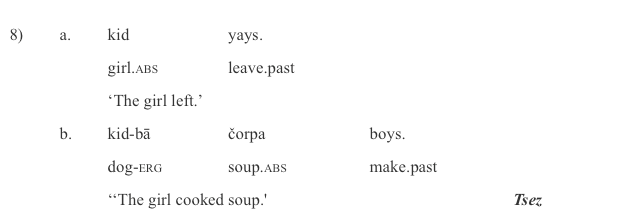
When presenting data from other languages (and from English) there’s a standard format for presenting data. It’s called an “aligned interlinear gloss”. Absolutely standard everywhere. There’s no getting around using it. In example sentences are presented using three line. The top line is the example in the language itself. The bottom line is a rough translation. The middle line is the issue. The middle line represents a word by word gloss of the language line above it. This gloss *has* to be aligned with the word above. The standard way to do this is to use a table. This makes sure that each gloss is aligned with the word in the foreign language above. Here’s an example:
The issue is that Editoria11y flags all of these as tables without header rows. Since these are red-flag warnings in Editoria11y, there’s no way to mark these as “Ok” exceptions to the table-header rule. Thing is, they aren’t actually tables. So they shouldn’t have header rows. They are examples that just happen use table formatting to get the correct alignments of items.
Has anyone else dealt with this? Any thoughts on how to address it? Is there a way to format this content in Pressbooks that’s NOT a table? I checked with Pressbooks Support and Mich thought formatting as images instead of tables would not improve accessibility. Mich suggested posting here.
We could add a note to the Accessibility Statement. In eCampus Ontario’s Essentials of Linguistics, they say the following:
Glossed linguistic examples are formatted in tables that can be navigated by tabbing, and are tagged as non-English when applicable for screenreaders.
I think this might an ideal usecase for the HTML element <pre>, which is designed to
represent preformatted text which is to be presented exactly as written in the HTML file. The text is typically rendered using a non-proportional, or monospaced font. Whitespace inside this element is displayed as written …
You may not like the default output for <pre> elements in your book, but can change this with custom CSS. I’ve used this for poetry that has very specific lineation and spacing requirements essential to the poem, for example.
We have a similar situation in a language book we finished about a year or so. @SteelWagstaff could adding a visually hidden header row be a way to handle it?
You could, but I think you’d be inventing a workaround to justify a workaround. The general principle of semantic HTML ( Semantics - Glossary | MDN ) should probably be observed. Table elements for non-table content is one of the earliest and most frequent violators of this principle in web development.
For the example you provided, you might try something like:
Using display: table / table-cell keeps semantic HTML (no <table>) but gives you print-like column alignment. That’s a lot of effort though – I’m not sure whether it’s worth just accepting that you’ve used non-tabular data in a table and living with the accessibility consequences or not.