# Photo Caption Line Spacing for eBOOK
**URL:** https://pressbooks.community/t/photo-caption-line-spacing-for-ebook/1266
**Category:** Custom CSS, Styling, Themes
**Created:** [February 27, 2020, 5:33pm UTC](https://pressbooks.community/t/photo-caption-line-spacing-for-ebook/1266 "2020-02-27T17:33:57Z")
**Posts on this page:** 5
**Page:** 1
### Author:  [@jctripp](https://pressbooks.community/u/jctripp)
#### Post date: [February 27, 2020, 5:33pm UTC](https://pressbooks.community/t/photo-caption-line-spacing-for-ebook/1266/1 "2020-02-27T17:33:57Z")
I have been trying to find some CSS custom code to change the line spacing on photo captions in the ebook version of the Austen theme. Have had no luck so far, even applied a Heading 5 style and that got stripped out. The attached images is showing the current line spacing, which is like a double line.
Can you please provide custom CSS code to reduce the line spacing? And while you’re at it, any other customization? Thanks for your help!!
[Screen Shot 2020-02-27 at 12.30.21 PM|184x164](https://pressbooks.community/uploads/short-url/xHNoaBpo8beUjizWlXBswgKHtmH.png)
---
### Author:  [@SteelWagstaff](https://pressbooks.community/u/SteelWagstaff)
#### Post date: [February 27, 2020, 5:51pm UTC](https://pressbooks.community/t/photo-caption-line-spacing-for-ebook/1266/2 "2020-02-27T17:51:37Z")
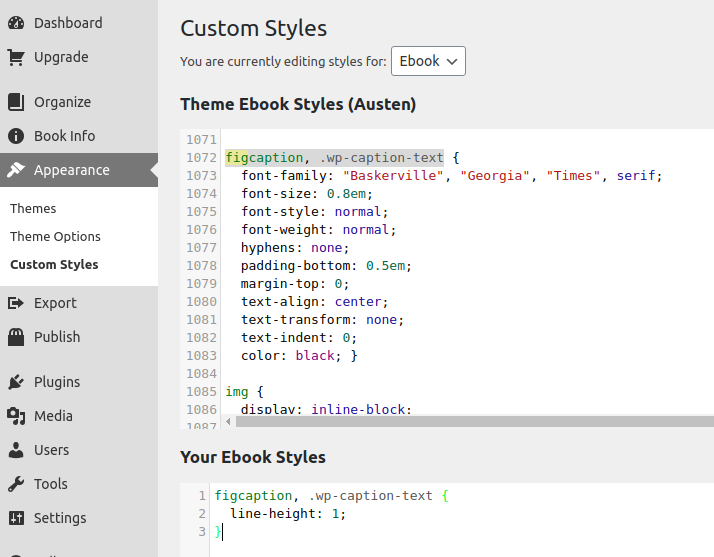
Hi @jctripp! Have you tried setting a line-height value ([https://developer.mozilla.org/en-US/docs/Web/CSS/line-height](https://developer.mozilla.org/en-US/docs/Web/CSS/line-height)) for the `figcaption, .wp-caption-text` attributes using the ebook stylesheet in ‘appearance’-\>‘custom styles’?
---
### Author:  [@jctripp](https://pressbooks.community/u/jctripp)
#### Post date: [February 27, 2020, 5:53pm UTC](https://pressbooks.community/t/photo-caption-line-spacing-for-ebook/1266/3 "2020-02-27T17:53:37Z")
Thanks for your reply. No I haven’t, would I past the figcaption code into custom style?
What exactly would the code be?
---
### Author:  [@SteelWagstaff](https://pressbooks.community/u/SteelWagstaff)
#### Post date: [February 27, 2020, 5:56pm UTC](https://pressbooks.community/t/photo-caption-line-spacing-for-ebook/1266/4 "2020-02-27T17:56:36Z")
Hi JC – yes, if you want to change the appearance of your book or your export files, you can use custom styles and CSS to do that. We can’t provide detailed support on the customizations you’d want to make, but we have a general guide chapter on using ‘custom styles’ available here: [https://guide.pressbooks.com/chapter/customizing-your-exports-with-custom-styles/](https://guide.pressbooks.com/chapter/customizing-your-exports-with-custom-styles/). The link I shared earlier explains more the specific CSS property line-height, which is what I’m guessing you’re wanting to change.
---
### Author:  [@jctripp](https://pressbooks.community/u/jctripp)
#### Post date: [February 27, 2020, 6:04pm UTC](https://pressbooks.community/t/photo-caption-line-spacing-for-ebook/1266/5 "2020-02-27T18:04:10Z")
Great, thanks! This is what I needed.