# Changing sticky information
**URL:** https://pressbooks.community/t/changing-sticky-information/4157
**Category:** Installing/Hosting Pressbooks
**Created:** [April 1, 2025, 10:39am UTC](https://pressbooks.community/t/changing-sticky-information/4157 "2025-04-01T10:39:25Z")
**Posts on this page:** 7
**Page:** 1
### Author:  [@johnpeterm](https://pressbooks.community/u/johnpeterm)
#### Post date: [April 1, 2025, 10:39am UTC](https://pressbooks.community/t/changing-sticky-information/4157/1 "2025-04-01T10:39:25Z")
I have self hosted pressbook, I would like to change the sticky information that appears on home page. See the attached image…Please guide how can I change this.

---
### Author:  [@SteelWagstaff](https://pressbooks.community/u/SteelWagstaff)
#### Post date: [April 1, 2025, 3:08pm UTC](https://pressbooks.community/t/changing-sticky-information/4157/2 "2025-04-01T15:08:11Z")
@johnpeterm you can go to your network settings page `https://YOURNETWORK.URL/wp-admin/network/settings.php` and uncheck the ‘Display the CTA banner’ setting to remove the banner:
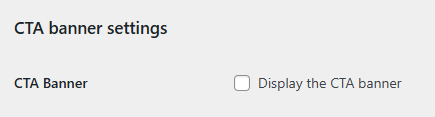
If you want to edit the banner content, you can find the code for that in the pressbooks-book repo: [pressbooks-book/header.php at c33128bf69dee37022691e887448dd62e8d171ef · pressbooks/pressbooks-book · GitHub](https://github.com/pressbooks/pressbooks-book/blob/c33128bf69dee37022691e887448dd62e8d171ef/header.php#L112)
---
### Author:  [@johnpeterm](https://pressbooks.community/u/johnpeterm)
#### Post date: [April 2, 2025, 4:13am UTC](https://pressbooks.community/t/changing-sticky-information/4157/3 "2025-04-02T04:13:01Z")
@SteelWagstaff Thank you.
I would like to replace with my own logo in the home page, appreciate if you could help me. See the attached image…

---
### Author:  [@SteelWagstaff](https://pressbooks.community/u/SteelWagstaff)
#### Post date: [April 28, 2025, 7:31pm UTC](https://pressbooks.community/t/changing-sticky-information/4157/4 "2025-04-28T19:31:06Z")
@johnpeterm As a super admin, visit `https://YOURNETWORK.URL/wp/wp-admin/customize.php` and replace the Logo in ‘Site Identity’: [https://networkmanagerguide.pressbooks.com/chapter/customize-your-networks-appearance/#chapter-103-section-1](https://networkmanagerguide.pressbooks.com/chapter/customize-your-networks-appearance/#chapter-103-section-1)
---
### Author:  [@johnpeterm](https://pressbooks.community/u/johnpeterm)
#### Post date: [April 29, 2025, 3:16am UTC](https://pressbooks.community/t/changing-sticky-information/4157/5 "2025-04-29T03:16:53Z")
@SteelWagstaff Thank you.
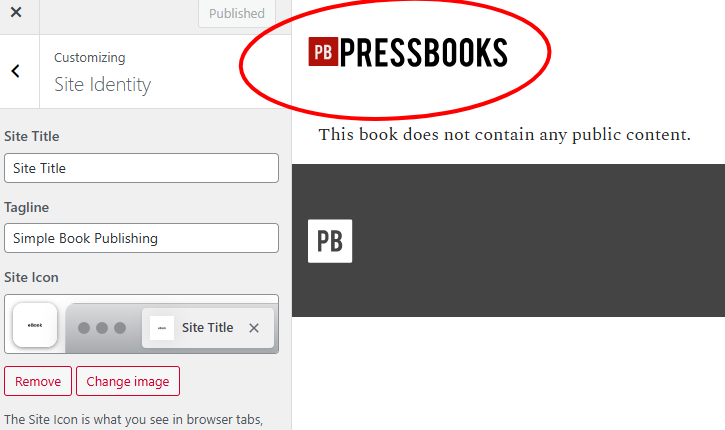
I could change only the site icon and not the site main logo, see the screenshot.
I wanted to change the main logo of the site.
---
### Author:  [@SteelWagstaff](https://pressbooks.community/u/SteelWagstaff)
#### Post date: [April 29, 2025, 3:28am UTC](https://pressbooks.community/t/changing-sticky-information/4157/6 "2025-04-29T03:28:29Z")
You should see an option to set the site logo about Site Title and Tagline.
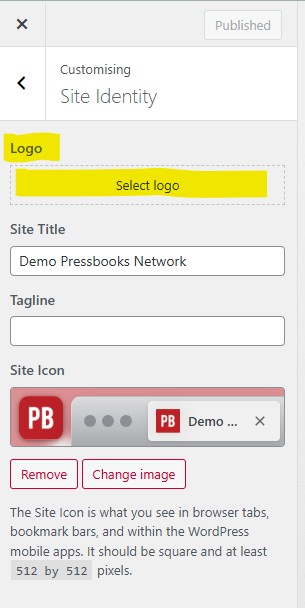
If you don’t, it may be because you’ve made customizations or modifications to your installation? I would recommend updating Pressbooks and the Aldine theme to latest release or sharing the contents of your diagnostics page so that others can help diagnose what might be happening here.
---
### Author:  [@johnpeterm](https://pressbooks.community/u/johnpeterm)
#### Post date: [April 29, 2025, 3:47am UTC](https://pressbooks.community/t/changing-sticky-information/4157/7 "2025-04-29T03:47:13Z")
@SteelWagstaff Thank you. I will update the pressbook and check it.